
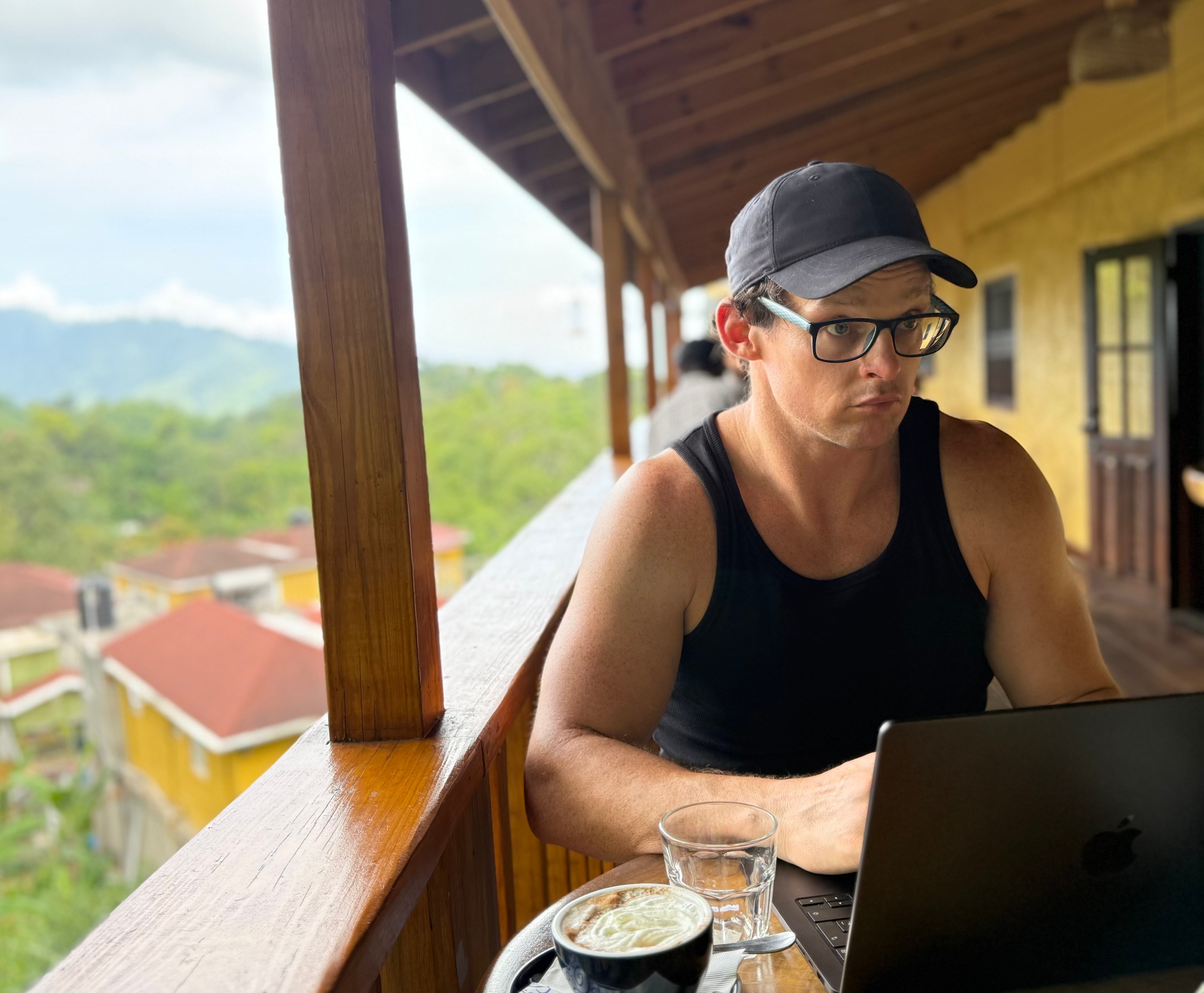
Photo from the Blue Mountains in Jamaica – one of the many spots I’ve been able to work at with the Starlink Mini
Is the Starlink Mini Right For You?
5 Easy Questions To Find Out
Starlink Mini FAQ’s
✅ General FAQ’s
What is the Starlink Mini and how does it work?
The Starlink Mini is a compact satellite internet system that connects directly to SpaceX’s satellite constellation, delivering high-speed internet almost anywhere.
What are the costs associated with the Starlink Mini?
Costs typically include the one-time hardware purchase and a monthly subscription fee. Prices vary by region and plan type for the Starlink Mini.
How do I set up the Starlink Mini?
Setup is quick: position the dish with a clear view of the sky, plug in the power supply, and connect through the Starlink app to get your Starlink Mini online in minutes.
What are the Starlink Mini internet speeds?
The Starlink Mini delivers broadband-level speeds, often reaching over 100 Mbps depending on your location and network conditions.
Is the Starlink Mini fast enough for video calls?
Yes. The Starlink Mini supports smooth video calls on Zoom, Teams, and Google Meet, even in remote areas, with minimal lag or dropouts.
Can I connect multiple devices to the Starlink Mini?
Yes. You can connect multiple devices—such as laptops, phones, and tablets—via Wi-Fi, making the Starlink Mini ideal for families or remote teams.
Can I use the Starlink Mini while traveling?
Absolutely. The Starlink Mini is designed for portability, so you can take it on road trips, camping, or international travel where Starlink service is available.
What happens if I use the Starlink Mini outside my home region for more than 2 months?
Starlink allows roaming, but extended use of the Starlink Mini outside your registered region (over 2 months) may reduce priority service or require a plan adjustment.
Can I use the Starlink Mini in areas without cellular coverage?
Yes. The Starlink Mini works independently of cell towers, providing internet access in locations where mobile networks don’t reach.
Are there data caps with Starlink Mini service?
Starlink does not have strict data caps, but heavy use of the Starlink Mini may be subject to network management during peak hours.
🚀 Performance & Speeds
What are the Starlink Mini speeds?
Users can typically expect download speeds between 50 to 150 Mbps, depending on location and network congestion. See my speeds and more here.
Are there any data caps with Starlink services?
Depending on the package yes, the introductory packages include 50 GB’s, but they also have unlimited packages too.
Can I connect multiple devices to the Starlink Mini?
Yes, the Mini Dish can support multiple devices via Wi-Fi, allowing several users to connect simultaneously.
Is The Starlink Mini Fast Enough For Video Calls?
Yes, with proper setup I’ve had dozens of long video calls in countries all over the world without issue.
🛠️ Setup & Usage
How do I set up the Starlink Mini?
The Mini Dish comes with an easy-to-follow installation guide. Simply plug it in, connect to the Starlink app, and follow the prompts to align the dish. See my 5 steps to getting faster Starlink speeds here.
Is the Mini Dish weather-resistant?
Yes, the Starlink Mini is designed to withstand various weather conditions, including rain and snow.
What happens if I lose power while using the Mini Dish?
If power is lost, the Mini Dish will stop functioning until power is restored. Data transmission will resume automatically once power is back on.
🧰 Troubleshooting & Support
What should I do if I experience connectivity issues?
Check the Starlink app for network status, check the obstructions tool in the app. Ensure the dish is correctly positioned and unobstructed, and reboot the device if necessary. If all else fails, check the availability map on Starlink.com to verify that you’re not in an area that is “Sold Out” as that can affect speed too
Where can I find customer support for the Starlink Mini?
Is pretty notoriously horrible. I just post in the Starlink Reddit, I also know some people use X. I don’t have an account so not sure.
💰 Pricing & Subscription
What are the costs associated with the Starlink Mini?
The costs include the initial purchase price of the Mini Dish and a monthly subscription fee for internet service, and a power source (if you’re using it outside of homes / hotels)
Do I need to be a Starlink subscriber to use the Mini Dish?
Yes, you must have an active Starlink subscription to use the Mini Dish and access the internet.
Who Am I & Why Trust Me?

Predjama Castle in the mountains of Slovenia. I was able to check out this castle, then hop on a sales call right afterwards thanks to the Starlink Mini. Check out my RV trip around Europe with the Starlink here.
I used this Starlink Mini on an RV trip across Europe for a month, where I had dozens of hour plus video calls, in 7 different countries.
Since then I’ve been using it around the world
I have been a digital nomad since 2019, and started solo traveling in 2011. Learn more about my story to digital nomadism here.
I’m old and seasoned at being a professional homeless.
I have spent $1,000’s on wifi tools, extenders, hotspots, all kinds of stuff. See my article about getting fast wifi anywhere here.
Would I Recommend The Starlink Mini?
Yes, I ran my business off of a Starlink Mini for weeks no problem.
Especially if you’re in more rural areas. You need a pretty clear view of the sky, so cities can be tough, but not impossible.
As of right now, I have the Unlimited Roaming Plan – and it’s working well for my needs. Here are the terms and conditions of that plan.
About The Starlink Mini & Why I Picked It
“I started digital nomading for the freedom — now I’m holed up in cities, too afraid to leave in case the Wi-Fi drops and I’m screwed for work.”
I felt a bit trapped man, I want adventures without stressing about wifi connection!
I want to experience parts of the world very different from what I’ve seen.
The Starlink Mini is a portable satellite you can use in many parts of the world, getting super fast wifi in super remote parts of the world.
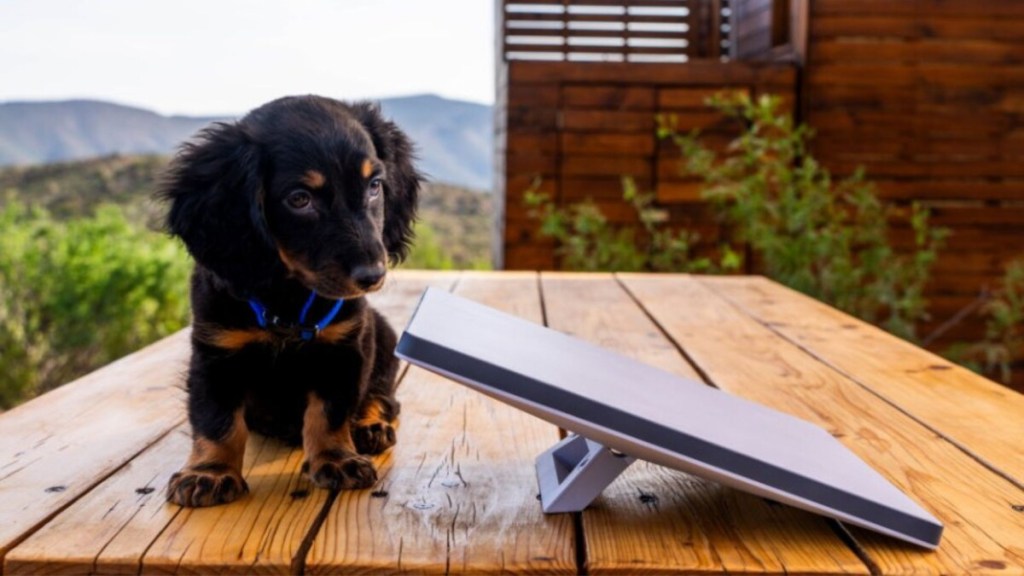
Great photo showing the size of the Mini @Michael Nicolls on X
I picked it because it’s portable, and with the right plan you can use it in a ton of countries around the world!

Starlink availability, Starlink is pretty regularly adding countries, so stay up to date on where it’s available.
READY FOR TOTAL FREEDOM?
get the starlink mini now!
Pricing & Costs
Hardware
Starlink Mini costs $400 – $600 for the hardware
Monthly Subscription Fee
Starting at ~$40. Pricing does appear to change depending on what country you register the Starlink in.

Photo of pricing plans (which are subject to change)
Additional Costs – Alternative Power Sources
If you will always be within 15 meters (50 feet) of a power outlet, then you won’t need any additional power sources!
If not, here are my recommendations
Battery Pack Setup I recommmend
With this setup I’ve ran the Starlink for 3 – 4 hours no problems! I’m actually running this setup to write this article right now!
If you don’t fly around, and don’t mind something bigger
- Jackery Explorer 300 Power Station(you can not fly or even ship this anywhere)
- I got up to 8 hours of Starlink use from this puppy
If you have a car / RV or rent lots of them
- Xnewa Starlink Mini DC Power Cable Cigarette Lighter Adapter
- Used this one in multiple countries, and never had any issues with it. Check out my RV trip around Europe here!
Coverage & Speeds
At the time of writing this you can use the Starlink Mini in any of the countries that Starlink is available (approx. 105 countries at the time of writing this).
According to Starlink, with the Unlimited Roaming Plan that I have I should expect speeds like the following.
- Download: 75-240 Mbps
- Upload: 8-30 Mbps
- Latency: <99ms
Here is actual WiFi speeds I have ran all over the world comparing the Starlink Mini to the Solis Hotspot.
Not sure what these speeds mean? Check out my guide to fast wifi here.
Those tests with high packet loss were mostly due to poor setup, over Starlink issues per se.
READY FOR TOTAL FREEDOM?
get the starlink mini now!
5 Steps To Increase Internet Speeds With The Starlink Mini
1. Clear View Of The Sky!
Upon my research it appears that if you’re in the northern hemisphere, the Starlink will want a clear view to the north.
If you’re in the Southern hemisphere, the Starlink will want a clear view to the south.
Pro tip – if you go to the app, then go to the Obstructions – and the “Verify Obstructions” feature you can take a screenshot of the sky to see how many obstructions you may get in each area. If you can get these pre-test to near zero obstructions you should be golden.
2. Give It Some Time
Within 1 – 2 hours the wifi connection becomes very stable.
Here are some test results I’ve done from Kingston, Jamaica
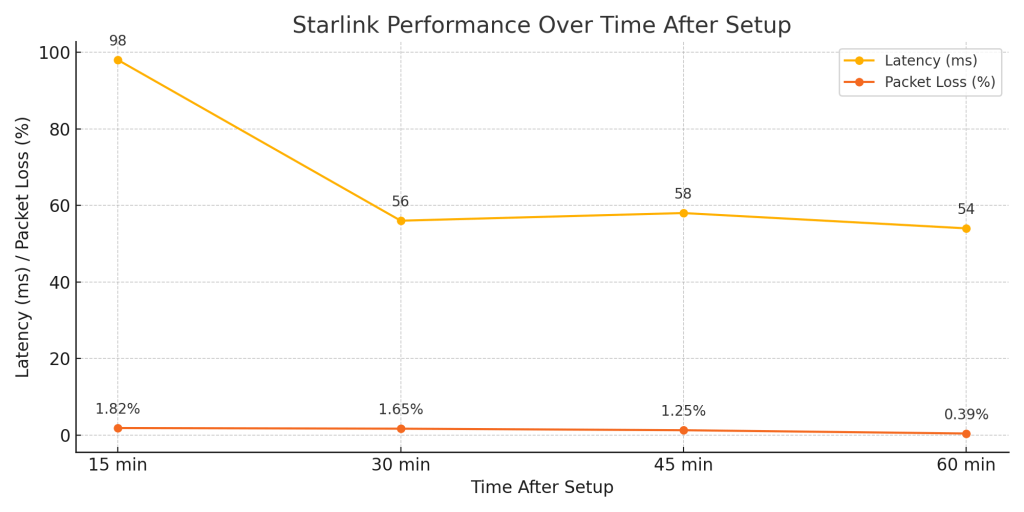
Ideal Latency – Less than 100 – Ideal Packet Loss – Less than 1% Click here to learn more about wifi speeds
3. Stay Out Of Urban Areas
For 2 Reasons
- The more Starlink users in the area, the slower the speeds will be.
- Clear Views of the sky are hard to find in urban areas
- Pro tip – If you’re in an urban area, try to find a hotel in a taller building with a rooftop that at least has a portion uncovered – then you’ll be solid.
- I’m writing this now from a hotel in downtown Kingston, the wifi of the hotel is okay, but not reliable enough for video calls, however my Starlink is getting 150+ download speeds!
- This won’t help with speed per se, but will make the internet speed more stable, which is just as important.
4. Ethernet Cord
- This won’t help with speed per se, but will make the internet speed more stable, which is just as important.
5. Upgrade Your Subscription
- The Starlink Mini’s standard packages will make you the lowest priority of all Starlink users.
- So if there is a lot of traffic, or issues with the connectivity, you’ll be the first person to lose wifi speed.
- However, purchasing a higher subscription will put you higher in priority if there’s congestion / issues.
Video from Switzerland where I was still learning how to setup the Starlink, and how obstructions affect things.
Starlink Mini vs. Cellphone Hotspot & Mobile Hotspots
| Starlink Mini | International Hotspots (i.e. Solis Hotspot) | |
| Very Fast Wifi 50+ Download Speeds | ✅ – With Proper Setup no problem | 🤔 – can get up to 50 download, but averages around 20 download speed |
| Urban Area Friendly | 🤔 Need a near 360 view of the sky, which can be tricky in urban areas. Usually Slower with lots of users nearby | ✅ – Great in urban areas |
| Country-side Friendly | ✅ – This is where the Starlink shines (as long as you have a good power source) | 🤔 If there isn’t mobile connection, it won’t work. |
| Built-in battery no external power needed | 🚫 – needs constant connection to a power source | ✅ – up to 18 hours of use off one charge |
| Real Unlimited Data Option Available | ✅ plans with unlimited data use available | 🚫 – Only up to 20 GBs – then you’re throttled or need to pay more |
| Level Of Service | 🚫 – pretty much non-existent, go to Starlink’s Reddit group to get help | 🤔 Does have support, but certainly isn’t winning any awards |
| International Coverage | 🤔 Officially you should only use it in approx. 105 countries – with countries in queue to be added | ✅ 135+ Countries |
READY FOR TOTAL FREEDOM?
get the starlink mini now!
Future Advancements in Starlink Technology and Satellite Internet
As satellite internet technology evolves, the future holds exciting possibilities for Starlink and its users. Here are some anticipated advancements that could enhance service offerings, expand coverage, and improve the overall user experience:
1. Increased Satellite Constellations
Starlink is continually launching new satellites to enhance its network. As more satellites are deployed, users can expect improved coverage and reliability, especially in areas that are currently underserved. The growing constellation will also reduce latency, making satellite internet more competitive with traditional broadband options.
2. Advanced Phased Array Technology
Future iterations of Starlink’s satellite dishes may incorporate advanced phased array technology, allowing for faster and more accurate signal tracking. This technology could enable the dish to maintain a stable connection even in challenging environments or while on the move, enhancing the experience for users who travel frequently.
3. Service Area Expansion
As Starlink continues to gain regulatory approvals globally, we can expect to see expanded service areas, including underserved regions in developing countries. This expansion could bridge the digital divide, providing reliable internet access to millions who currently lack connectivity.
4. New Pricing Models
Starlink may introduce tiered pricing plans that cater to different user needs. Options could include family plans, business packages, or pay-as-you-go models, allowing more flexibility and making the service accessible to a broader audience.
5. Integration with IoT Devices
As the Internet of Things (IoT) continues to grow, Starlink could evolve to support various IoT applications. This would enable seamless connectivity for smart devices, agricultural sensors, and remote monitoring systems, making satellite internet a viable solution for a range of industries.
6. Improved Ground Stations
Investments in ground infrastructure, including advanced ground stations, could further enhance data throughput and reduce latency. More robust ground stations would facilitate faster data transmission between satellites and the internet backbone.
8. Environmental Resilience
Future satellite designs may focus on sustainability and resilience to environmental factors. Innovations could include solar-powered satellites and designs that minimize space debris, contributing to a more sustainable approach to satellite internet.
9. Enhanced Connectivity Features
Starlink may explore additional features, such as:
- Seamless Roaming: Allowing users to maintain connectivity across different countries without having to change devices or settings.
- Multiple Device Connectivity: Improved capacity for connecting more devices simultaneously without degrading service quality.
Video of some speed tests I ran on the Croatian Coast
Conclusion – Do I Recommend It?
Yes I do.
It won’t fix all of your problems, but it will give you the freedom you dreamed of when you started digital nomadding.
READY FOR TOTAL FREEDOM?
get the starlink mini now!
🙋♀️ Want to stay up to date on my journey?
Follow Me On Instagram or Youtube – @officialdigitalnomadlifestyle
Are you a brand that would like to partner Together? 🙋♀️
Categories:
What about this limit in roaming, maximum 2 month outside your registered country? I have difficults finding clear answer to that.
Had the same issue being tied to Hotels & Coworking Space while in Asia. I have some specific thoughts and questions:
1. Does it work if I switch boarders & could border patrol or police take it away if Starlink is not permitted within a country (like Thailand currently)?
2. Have you every tried 4G stacking with multiple providers/sims to have better connection?
This doesn’t mention that you can only use it outside your home country for 2 months which seems like a big gotcha for digital nomads.
Thank you for your review, I would like to travel 1 month in europe, but not remates áreas, I am going to work at night in different hotels, however some of them don’t provide good internet connection, do you know if inside the hotels this is going to work with at least 25mbps?
Thank you for this useful article
Hey Yeimmy!
You need a clear, unobstructed view of the sky for the Starlink to work. Therefore I would recommend a solis hotspot, which will work anywhere but remote spots.
Hey Yeimmy — good question.
If you’re staying in hotels in major European cities, 25 Mbps is usually very doable, especially in business-oriented hotels. The bigger issue isn’t speed, it’s stability and whether the WiFi drops at night when more guests are online.
Since you’ll be working at night, that might actually work in your favor depending on the time zone. I’d still recommend asking the hotel directly for a recent speed test screenshot before booking. Some will send it if you explain you’re working remotely.
If reliable internet is critical, having a small backup hotspot is always a smart move. Europe is generally solid, but I never travel without a backup connection.
Great insights! It’s fascinating to hear how Starlink performs across different countries. As a digital nomad myself, reliable internet is crucial, so your experiences and tips are incredibly valuable. Thanks for sharing your journey!
Good catch, that’s a fair point.
The 2-month rule is one of those things Starlink hasn’t been super consistent about depending on the region and the plan type. Some people hit that limit exactly, others seem to go longer without issues.
I’ll probably add a note about that in the article because for nomads moving between countries it can definitely matter.
Hey Christian, great questions.
Border switching can work in some cases, but it really depends on how the plan is registered. Starlink has tightened enforcement in certain regions (Thailand included), so I wouldn’t rely on border hopping as a long-term solution. It might work temporarily, but it’s not something I’d build a workflow around.
Yes — I’ve experimented with 4G stacking using multiple SIMs and a load-balancing router. It can improve stability, but it won’t magically fix weak infrastructure. It’s more about redundancy than raw speed.
If you’re moving around Asia frequently, I’d focus on flexibility + backup layers rather than trying to engineer a perfect single setup.
Hey Rune, that’s a good question and honestly one of the more confusing parts.
The “2 month outside registered country” rule has been inconsistently enforced depending on region and plan type. Some users get flagged right around that mark, others don’t — it’s not always predictable.
If you know you’ll be long-term outside your home country, it’s usually safer to either re-register in the region you’ll be staying in or switch to a plan that’s designed for international mobility.
Starlink policies evolve pretty fast, so I’d always double-check the current terms before relying on it long-term.
This review is super helpful! I’ve been considering Starlink for my travels but was unsure about its performance in different countries. Your firsthand experience gives me confidence that it can handle the demands of a digital nomad lifestyle. Thanks for sharing your insights!
Appreciate that! That was exactly the goal with this review — to give a real-world perspective, not just specs.
Starlink has honestly been one of the most reliable options I’ve used while traveling, especially in places where local WiFi struggles.
Glad it helped you feel more confident about it!